
CARFAX - New & Used Cars
CARFAX, IncAuto & Vehicles
4.78.23K Reviews
- Version
- 6.52.1
- Installs
- 5.00M
- Age Rating
- Everyone
Screenshots
Our Review of CARFAX - New & Used Cars
 Analysis by Appyee
Before I decide whether a car is worth a closer look, I want to know more than its asking price and a few attractive photos. I want a manageable way to browse nearby listings, compare candidates and check the background of a used vehicle while I’m still deciding what to do next. That is the role the CARFAX app aims to fill: it brings car shopping and vehicle-history information together on a phone, so I can move from casual browsing toward a more informed shortlist.
What to expect from a car-shopping app
This is an app in the auto and vehicles category from CARFAX, Inc. It is free to download, rated for Everyone, and has a 4.6 average from around 26,000 ratings, with more than five million installs. Those figures suggest that plenty of drivers use it, but I would treat popularity as context rather than proof that any individual listing or history report is complete.
The useful distinction is that browsing a car and checking its history are different steps. A listing can help me spot a vehicle that suits my needs; a history report can add context about that specific used car. Neither replaces an in-person inspection, a test drive or careful questions for the seller. I find the app most valuable as an organizing and screening tool, not as a final verdict on whether a car is mechanically sound.
Getting oriented before you search
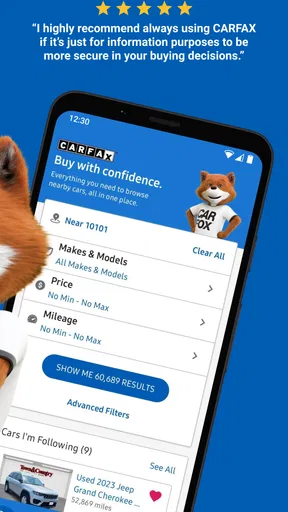
On a first visit, I would start with the practical basics: decide what kind of car I need, set a realistic price range and think about how far I am willing to travel. The browsing tools let me narrow cars by make, model, price range and distance from my location. That matters because a broad search can quickly become a wall of options, while a few sensible filters make the results easier to compare.
I would avoid making the filters too restrictive at the beginning. If I am unsure which model or exact price band makes sense, I can first browse a wider set, notice which vehicles appear repeatedly and then tighten the search. A little flexibility can surface alternatives I might not have considered, while a clear travel limit keeps the shortlist grounded in cars I could realistically go and see.
From a listing to a useful first check
Once a listing catches my eye, I would save it rather than rely on memory or leave it buried in a browser tab. Favorites are useful when I am comparing several cars over a few days: I can return to candidates and look at them as a group instead of restarting the search each time. I would note the details that matter to me, such as the asking price, distance and what I still need to ask the seller.
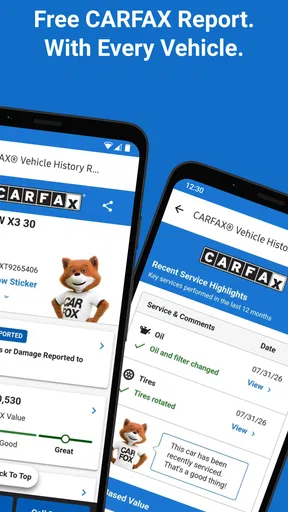
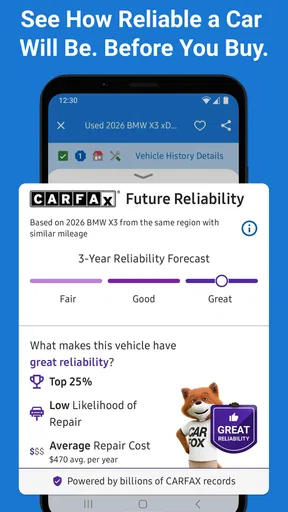
For a used car, the next meaningful step is to look at its vehicle history. If the history details raise a question, I would use that as a prompt for a direct conversation rather than assuming I already know the full story. A report can help me decide whether a viewing is worth my time, but it should not be treated as a substitute for checking the car itself. New-car shoppers may get more immediate value from browsing and price comparisons, since a used vehicle’s past is less central to their search.
Your Car Buying Sidekick
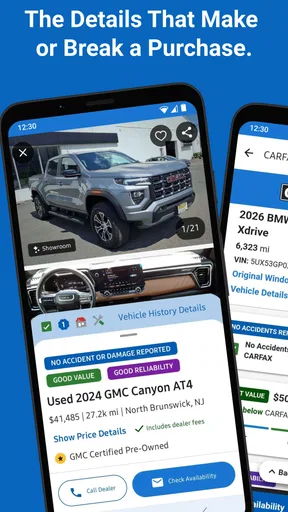
So, what's the big deal with CARFAX? Well, imagine having a detailed history of any used car you’re eyeing, right on your phone. Want to know if it's been in an accident or how many owners it's had? With just a few taps, you’ve got the scoop. This is especially handy when you're at a dealership or checking out a car in someone's driveway. No need to rely solely on what the seller tells you; you can verify it yourself.
Features That Make Life Easier
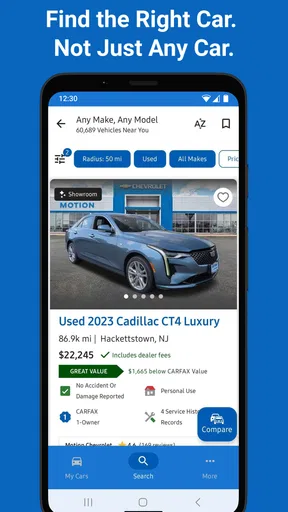
The app isn’t just about looking up vehicle history reports. It also lets you browse through a vast inventory of new and used cars. Filtering options are pretty sleek—by make, model, price range, and even distance from your location. It’s like having a personalized car show at your disposal.
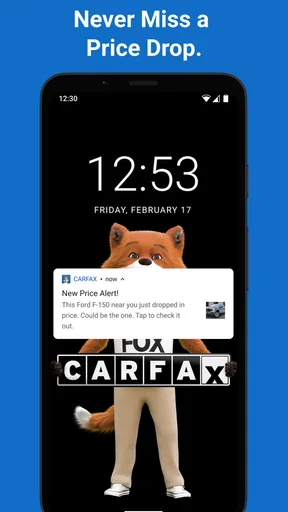
Another cool feature is the price comparison tool. You get to see if the car you’re considering is a good deal compared to others in the market. Knowledge is power, right? And this feature makes sure you’ve got plenty of it.
How I use price comparisons without overtrusting them
A price comparison is a helpful starting point, not a promise that a car is fairly priced in every meaningful sense. Two listings can look similar at a glance but differ in condition, equipment or history. I would compare like with like as far as I can, then treat an apparent bargain as a reason to investigate rather than an automatic win. A low price may reflect a detail that matters once I inspect the car or speak with the seller.
My practical approach is to use the comparison to identify questions: Is this asking price noticeably different from comparable cars? Is there a reason the seller gives for that difference? Does the vehicle’s history change how I view the deal? That turns a market snapshot into a useful conversation, while keeping me from making a decision based on a single number.
Common points of confusion when checking history
It is easy to read “history” as if it means a complete account of everything that has happened to a car. I would not make that assumption. A report is one source of information, and a clean-looking result cannot establish that a vehicle has never had a problem. I would still check the car in person, ask about its maintenance and arrange an independent inspection when the purchase warrants it.
Likewise, a history detail should be read in context. If a report flags something that concerns me, I would ask the seller for an explanation and supporting records, then decide whether to continue. If the details are reassuring, I would still inspect the vehicle. The useful outcome is not simply “good” or “bad”; it is knowing what to verify before spending time or money on the next step.
Simplicity Meets Functionality
Now, let’s talk about the user experience. The app is straightforward and intuitive. Even if you’re not a tech wizard, you’ll find your way around easily. It’s designed to be quick and responsive, which is perfect when you're making those split-second decisions.
One thing I really appreciate is the option to save your favorite cars. You can come back to them later, which is super handy if you’re juggling multiple options. It’s like having your own little car wishlist, ready for when you’re ready to make the plunge.
A realistic shopping-day workflow
Imagine I have a free afternoon and have found two used cars within a reasonable drive. I can keep both in my favorites, compare their asking prices and review the available history details before I set off. If one report prompts a question, I can contact that seller first; if the answer is unclear, I can avoid spending the afternoon on a viewing that is unlikely to suit me. For the other car, I can arrive with specific points to check rather than relying on a quick impression.
This is where the app earns its place for me: it helps make the early stages less scattered. I would still bring the same care to a viewing that I would without it. I would inspect the interior and exterior, take a test drive and consider a mechanic’s assessment. The app helps me choose where to focus my attention; it does not make those real-world checks unnecessary.
Who will get the most from it
I would recommend it most to someone actively comparing new or used cars, especially a first-time buyer who wants a straightforward starting point for browsing and checking used-car history. It can also suit a shopper who is looking at several candidates and wants to keep a shortlist in one place. The combination of listings, filters, saved favorites and price comparisons gives that person a practical way to narrow choices before calling sellers or visiting lots.
It may be less useful if I already know exactly which car I want and am not interested in browsing, or if I expect an app to make the buying decision for me. A person who mainly wants a hands-on mechanical assessment should prioritize a qualified inspection. Someone who wants to search across a broader range of marketplaces may also prefer a general classifieds or vehicle-shopping service as their main discovery tool, then use CARFAX as one part of the research process.
How it fits alongside other ways to shop
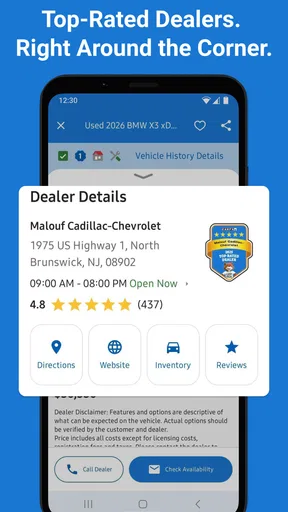
Compared with general classified-ad apps, the appeal here is the focus on vehicle shopping alongside history information and price comparisons. A general marketplace may be a better place to cast a very wide net or find listings from a particular local source, depending on what is available in the area. I would not assume one app contains every car on the market. For a serious search, it can make sense to check more than one source and use this app to help assess candidates that appear there.
Compared with going directly to a dealership, browsing on a phone lets me begin privately and at my own pace. A dealer can answer questions and arrange a viewing, but I still want independent context before I feel ready to make a decision. The app is not a replacement for that conversation; it helps me arrive better prepared. For a new car, I would also check the manufacturer’s own details for exact configuration and availability, since a listing is only one part of choosing the right vehicle.
Small habits that make the search more useful
I get more value by saving a short list of genuinely different candidates than by collecting every listing that looks attractive. Too many favorites make comparison harder, not easier. I would keep a few options that meet my needs and use the same questions for each: does the price make sense beside similar cars, what does the history suggest I should clarify, and can I realistically view and test-drive it?
I would also revisit a listing before making plans, rather than assuming details remain unchanged. Online car shopping is a moving process, and the seller’s current answers matter more than an old note I made while browsing. If something important is unclear, I would ask before travelling. That simple habit can save time and helps separate a promising listing from one that only looks convenient on a screen.
What the app cannot settle for you
The main limitation is the same one I keep in mind with any digital vehicle search: information on a screen is not the car in front of me. A history report and price comparison can reduce uncertainty, but they cannot tell me how the vehicle feels to drive or guarantee its present condition. Listings also depend on the details sellers provide, so I would confirm important facts directly rather than treating an app entry as a contract.
There is also a judgment call in balancing convenience against coverage. If I am only browsing for fun, a focused shortlist may be more useful than spending time cross-checking every possible listing. If I am close to buying, I would widen my research, contact sellers, inspect the car and consider professional help. The app works best when I use it as a first filter and keep the more consequential checks for the real world.
Version, value and a sensible next step
The app is free, and its current version is 6.37.0; it requires Android 11 or later. Its Everyone age rating makes it broadly accessible, though the content is aimed at people shopping for vehicles rather than casual users looking for entertainment. CARFAX has been available since June 29, 2012, and its 7,400 reviews offer another sign that shoppers have used it over time, though I would still judge it by whether its tools fit my own search.
After finding a promising car, my next step would be to save it, review its history, compare its price with similar options and contact the seller with any specific questions that came up. If the answers hold together, I would arrange a viewing and test drive; if they do not, I would move on without feeling committed just because I had spent time researching it. That is a reassuring way for a first-time buyer to turn an uncertain search into a sequence of manageable decisions.
The Bottom Line
In a nutshell, the CARFAX app is like your own personal car detective. It takes a lot of the guesswork and anxiety out of buying a car. With all the crucial info just a tap away, you’re in the driver’s seat when it comes to making informed decisions.
So, if you’re in the market for a new ride, give this app a go. You might just find it becomes an indispensable part of your car-buying journey. Happy car hunting!
Privacy and Permissions
See what permissions an app requests and how it handles your data.
- Identity
- find accounts on the device
- Contacts
- find accounts on the device
- Location
- approximate location (network-based), precise location (GPS and network-based)
- Phone
- directly call phone numbers
- Camera
- take pictures and videos
- Wi-Fi connection information
- view Wi-Fi connections
- Other
- view network connections, control flashlight, full network access, run at startup, draw over other apps, control vibration, prevent device from sleeping, Google Play license check
Verdict
Strengths of CARFAX - New & Used Cars
- Comprehensive vehicle history reports.
- User-friendly interface for easy navigation.
- Access to detailed maintenance records.
- Helps negotiate better prices with sellers.
- Alerts for open recalls and safety issues.
Limitations of CARFAX - New & Used Cars
- Subscription required for full reports.
- Limited free features available.
- Occasional data discrepancies reported.
- Not all vehicles have comprehensive data.
- App performance can be slow at times.
Other Releases by CARFAX, Inc
View All
CARFAX Car Care App
Auto & Vehicles4.7
Similar Picks in This Category
View All
Android Auto
Google LLC4.1

maxim — order a taxi & food
PT. SITO4.7

Штрафы ГИБДД: проверка с фото
Pays LLC – Штрафы ГИБДД4.7

Номерограм – проверка авто
Авто Ассист4.8

Дром Авто
Дром4.9

Frequently Asked Questions
What is CARFAX and how does it work?
CARFAX is an app designed to help users find new and used cars with confidence. It provides detailed vehicle history reports, including past ownership, accident history, and service records. By entering a vehicle’s VIN or license plate number, users can access comprehensive data, ensuring informed purchasing decisions.
Is CARFAX free to use, or are there any costs involved?
While downloading the CARFAX app is free, accessing detailed vehicle history reports typically involves a fee. CARFAX offers various pricing options depending on the number of reports you wish to purchase, ensuring flexibility for both casual users and serious buyers. Some dealerships may provide free CARFAX reports for their listings.
How accurate and reliable are the reports provided by CARFAX?
CARFAX is known for its accuracy and reliability, as it collects data from thousands of sources, including DMV records, insurance companies, and repair shops. However, it's important to note that not all incidents may be reported, so while CARFAX is a valuable tool, it should be used in conjunction with other checks, like professional inspections.
Can I use CARFAX to find cars for sale near me?
Yes, CARFAX not only provides vehicle history reports but also allows users to search for cars for sale in their local area. The app includes listings from dealerships and private sellers, with filters for price, mileage, year, and more, making it easier to find a car that suits your needs.
What types of vehicles can I check using the CARFAX app?
CARFAX covers a wide range of vehicles, including cars, trucks, SUVs, and even some motorcycles. As long as the vehicle has a VIN, users can obtain a history report. This makes CARFAX a versatile tool for anyone in the market for various types of vehicles, ensuring transparency and peace of mind.
